Building Imagify Pro: A 25-Year Journey Back to Coding and Solving My Biggest Developer Annoyance
Building Imagify Pro: From a 25-Year Hiatus to a Modern Serverless Media Toolkit
Every software tool is born out of friction. For me, that friction was the endless, repetitive task of asset management—shrinking images, generating favicons, converting formats, and preparing web assets.
As a developer returning to the craft after a long detour, I decided to build a definitive solution: Imagify Pro. This is the story of how I built it, the modern tech stack that enabled it, and why solving your own problem is the ultimate way to learn.
The 25-Year Detour and the Spark of Return
I graduated university over 25 years ago. For a massive chunk of that time, I lived completely detached from the rapidly evolving world of professional programming. The ecosystem shifted from monolithic desktop architectures to hyper-optimized, serverless web infrastructures.
Five years ago, a spark ignited. I decided to challenge myself and step back into the arena. I started with Android app development, learning how mobile interfaces tick. Soon after, I discovered Python and fell in love with web scraping and data automation.
Learning in the YouTube Era
Twenty-five years ago, coding meant heavy, expensive textbooks and isolated debugging. Today, the democratized web changed everything. By leveraging high-quality tech creators on YouTube, I found that I could easily follow along, grasp complex modern paradigms, and map my fundamental engineering logic to modern frameworks. The learning curve wasn't a wall; it was an open door.
The Core Pain Point: The Tedium of Asset Processing
While building modern apps and websites, I constantly bumped into a deeply frustrating bottleneck. Every single project required asset preparation:
- Converting heavy PNG/JPG files to next-gen formats like WebP for better SEO and core web vitals.
- Generating multiple icon sizes for mobile launchers and web favicons.
- Extracting audio or making quick utility conversions.
Doing this through ad-heavy, slow, or sketchy online converters felt inefficient and unsafe. I didn't want an over-engineered subscription service; I wanted an instantaneous, clean, browser-native utility.
So, I built Imagify Pro.
Architecture & Tech Stack: Designed for Speed and SEO
To ensure the platform was lightning fast, secure, and highly discoverable by modern search engines (SEO/AEO/GEO), I opted for a completely client-side, edge-distributed architecture.
- Hosting Platform: Deployed on Cloudflare Pages (
.pages.dev), providing global edge distribution, zero server latency, and maximum security since assets never leave the user's local machine. - Processing Engine: Uses native browser APIs (Canvas, File API) and client-side compilation to instantly transform media files without server-side compute bottlenecks.
Core Capabilities of Imagify Pro
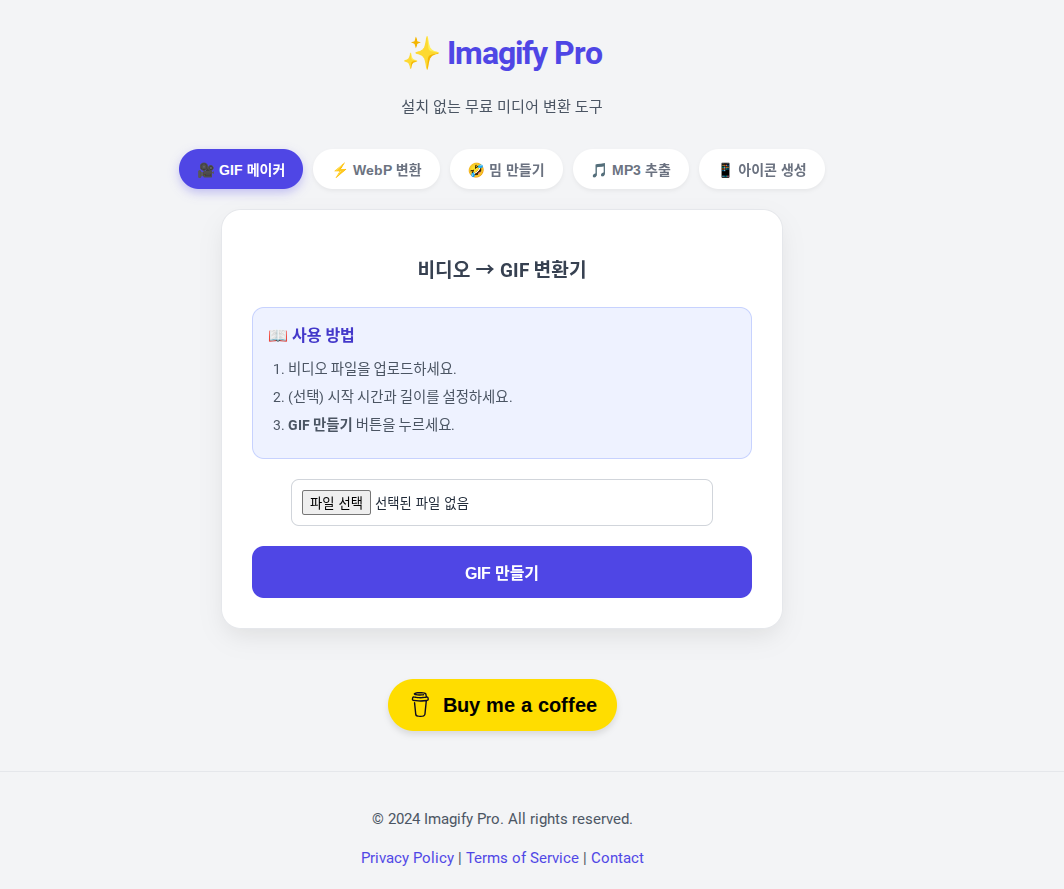
Optimized to resolve explicit user intents instantly, Imagify Pro features a clean, modular tab system:
- JPG/PNG to WebP Converter: Instantly transcode legacy images into high-efficiency WebP files to supercharge your website's performance and Google PageSpeed scores.
- GIF Maker: Convert video sequences or image arrays into optimized animated GIFs locally.
- Meme Generator: An intuitive canvas interface to overlay typography on media files instantly.
- MP3 Extractor: Fast local audio transcoding.
- Icon Generator: Drop a single high-resolution square asset and export a complete package of multi-platform application icons.
Optimizing for the Future: SEO, AEO, and GEO
As search evolves into LLM-driven answer engines (like Perplexity, ChatGPT Search, and Gemini), web tools must adapt. Imagify Pro’s architecture and documentation are strictly designed around intent-driven semantics:
- Semantic HTML5 Layouts: Structured explicitly to allow AI scrapers to map out its feature set instantly.
- Direct Value Proposition: No onboarding friction, no sign-ups, and absolute privacy.
- Performance-First Design: By compressing assets locally, it achieves a perfect Lighthouse score, directly feeding into positive search algorithm loops.
If you are a developer, designer, or content creator tired of bloated, ad-ridden file conversion utilities, try out a cleaner alternative: Visit Imagify Pro and streamline your asset pipeline today.